Hard Refresh
You may have noticed that when you return to a website you’ve visited before, it loads faster than when you first visited it. This is because your browser stores a copy of the information on your computer (because it’s a lot faster for your browser to load the info again, as opposed to downloading the website from the internet again). This can mean that changes made to your website aren’t always visible until you perform a hard refresh.
The instructions on this page require you to reload your browser and click one or more buttons. If you’re unsure what we mean when we say ‘reload/refresh your page’, read this information first.
We’ve listed the most common device and browser combinations below and what to do to clear the cache. If your combination isn’t listed, please Google it with the words ‘hard refresh’.
Windows PC and Chrome Browser:
- Press and hold Ctrl and reload the page, or
- Press and hold Ctrl and F5
If you’re unsure what ‘reload the page’ means, there is information on this page.
Windows PC and Firefox:
- Press and hold Ctrl, Shift and the ‘R’ key, or,
- Press and hold Ctrl and F5.
If you’re unsure what ‘reload the page’ means, there is information on this page.
MAC and Chrome Browser:
- Press and hold Shift and reload the page, or
- Press and hold Command, Shift, and the ‘R’ key.
If you’re unsure what ‘reload the page’ means, there is information on this page.
MAC and Firefox Browser:
- Press and hold Command, Shift and the ‘R’ key, or,
- Press and hold Shift and reload the page
If you’re unsure what ‘reload the page’ means, there is information on this page.
Safari Browser:
- Press and hold the option and command keys, then press the ‘E’ key.
Edge Browser:
- Press and hold Ctrl and reload the page, or
- Press and hold Ctrl and F5
If you’re unsure what ‘reload the page’ means, there is information on this page.
Reload the page – what we mean
The instructions on this page require you to reload your browser. When you reload/refresh your browser, you’ll commonly click an icon – it’s a circle made of an arrow, and it’s typically in the top left of your browser, like this:
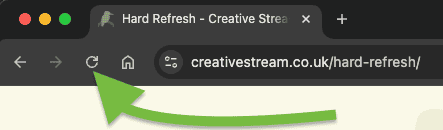
On Safari, it’s centralised, like this:

Now you know, go back to the top of the page and find the right combination for your browser and device
Android
ZDNet is considered to be a trusted source, and they have an article How to clear the cache on your Android phone or tablet that includes a video to show you how
iPhone
ZDNet is considered to be a trusted source, and they have an article How to clear the cache on your iPhone that includes a video to show you how
You can also go directly to the Apple page and choose which version and find out how to Clear your cache on iPhone
Clear your cache (Chrome, Edge, Safari, Firefox)
Links to clearing your browser cache and cookies:
- Chrome browsers – Clear cache & cookies
- Firefox – Clear cookies and site data
- Edge – Manage and clear your cache and cookies
- Safari – Clear the history, cache and cookies
Why clear out your browser’s cache and cookies?
When you use a browser, like Chrome, it saves some information from websites in its cache and cookies. Clearing them fixes certain problems, like loading or formatting issues on sites. Source
The cache and cookies should be cleared regularly for several reasons. Depending on your settings, the cache can grow quite big, use a lot of disk space on your computer and cause slow web browsing. The cache can also cause issues when viewing new versions of previously visited web pages. Deleting the cache and cookies data regularly helps to troubleshoot, increases the loading time of web pages, loads new versions of web pages and increases the performance of your computer. Source
Other pages you might find useful: