RackSpace email is an external service (like Google Analytics, Stripe, etc). It’s an add-on that Creative Stream provides but we cannot control, advise, or offer tech support. However, we want to empower you, so this page has links to guidance.
Set up
Do you need to add your email to a new device? You have three options:
1: Just log in and start sending emails
You can log in to your webmail here https://apps.rackspace.com/
2: Set up an email client (an email management system, such as Outlook)
You may want to set up an email client (often called an email management system), such as Outlook, Mozilla Thunderbird, Windows default, etc.
Go to https://emailhelp.rackspace.com/ and log in with your email address and password and it will walk you through setting up the mail on any standard device, with amazing, personalised visuals.
Information about email clients is in the explanation accordion.
3: Set things up technically and manually
For both IMAP (993) and SMTP (465): secure.emailsrvr.com You can read more on the RackSpace Email and Hosted Exchange settings page
Troubleshooting
- Speak to your colleagues to see if they are also affected, or if it’s only you.
- Go to https://status.apps.rackspace.com/ to see a real-time view of the performance and uptime of the email apps and services. If the area “Rackspace Email” says that the System is operating normally then…
- Log into your email via https://apps.rackspace.com. If you can log in and everything is working correctly then…
- Go to https://emailhelp.rackspace.com/ and log in to your email, and it will guide you through tech questions with helpful visuals that are easy to follow.
- If you’ve followed the steps above with no resolution, the glitch is likely to be with your email client and you must contact them for assistance as we are unable to help with another supplier’s products.
Explanation: email client, provider, and account
Creative Stream is the middleman between you and Rackspace. Rackspace supplies your email account (your email address) and they are the email service provider where you can log in to access your emails and start sending/receiving emails immediately.
We understand that it’s not always obvious (particularly when technical issues with email crop up), so the information below will help you.:
email account
An email account is your specific address (e.g. example@email.com) that you access via webmail (e.g. Rackspace email login) or your email client.
email service provider (ESP)
An email service provider or ESP (e.g. Gmail, Rackspace, Hotmail, Outlook, Yahoo, Proton Mail) provides the technical efforts behind the sending and receiving of your emails. The email service provider is the company that offers services for sending, receiving, and storing emails. These services offer web-based interfaces (webmail), allowing users to access their emails from any device with an internet connection (which is why you can log on to Hotmail, Gmail, etc on almost any device in the world with a browser to see your emails).
The email service provider often has specific rules or behaviours regarding the deletion, archiving, or threading of emails, and those rules or behaviours typically take precedence over any other rules that your email client may have.
email client (email management system)
An email client* is the application (e.g. Apple Mail, Android Mail app, Microsoft Outlook, Thunderbird) you use to access your emails. An email client application is software installed on your device that allows you to manage any or all of those email accounts in one dedicated app. Email clients offer a unified platform to access multiple email accounts (e.g. your Gmail, Yahoo, and Hotmail) all in one place.
An email client may have specific rules or behaviours regarding the deletion, archiving, or threading of your emails.
*Occasionally called an email management system.
Example:
Many people have an iPhone and use the Apple Mail app on their iPhones to access their (e.g.) Gmail email. In this case, the Apple Mail app is the client and Gmail is the email service provider.
If you use the Gmail app to access your Gmail account, then Gmail is both the client and the email service provider.
Unsure what you use?
Your email account uses a specific email service provider (Rackspace) and if you don’t use the Rackspace app to access your emails, then you’re using an email client (e.g., Outlook). We have no way of knowing what email client you have chosen on your device, and cannot help diagnose problems with another supplier’s product.
Examples of email clients you might have chosen to use:
Windows Live Mail comes with the Windows Operating System by default on most PCs. It’s a free desktop-based mail reader from Microsoft with basic features.
Microsoft Office Outlook is an email management system supplied by Microsoft you might use as part of a package in Microsoft 365.
Mozilla Thunderbird is a free and open-source email client that also functions as a personal information manager with a calendar and contactbook, as well as an RSS feed reader, chat client, and news client.
Sources: Pipedrive, Thunderbird, GetMailBird, Mailstrom, ActiveCampaign
Restrictions on use warning
This type of email account is for normal email use. Sending bulk/similar-looking mail to multiple people is a violation of the RackSpace terms of service, regardless of the amount, contents, or recipient opt-in status. If you do this then your email address will be blocked for a short duration (currently 24 hours), and we reserve the right to charge a small fee to cover our time. If these types of emails are vital to your daily business operations, we recommend using a mailing list solution, like MailChimp. If you want a solution to send emails from your site, we’re happy to discuss this as a separate project.
Reset a password
The advice below pertains to resetting your password via Rackspace (if you use Outlook or another email client you must seek advice from the supplier, but Google is often very helpful).
Please read our advice about passwords
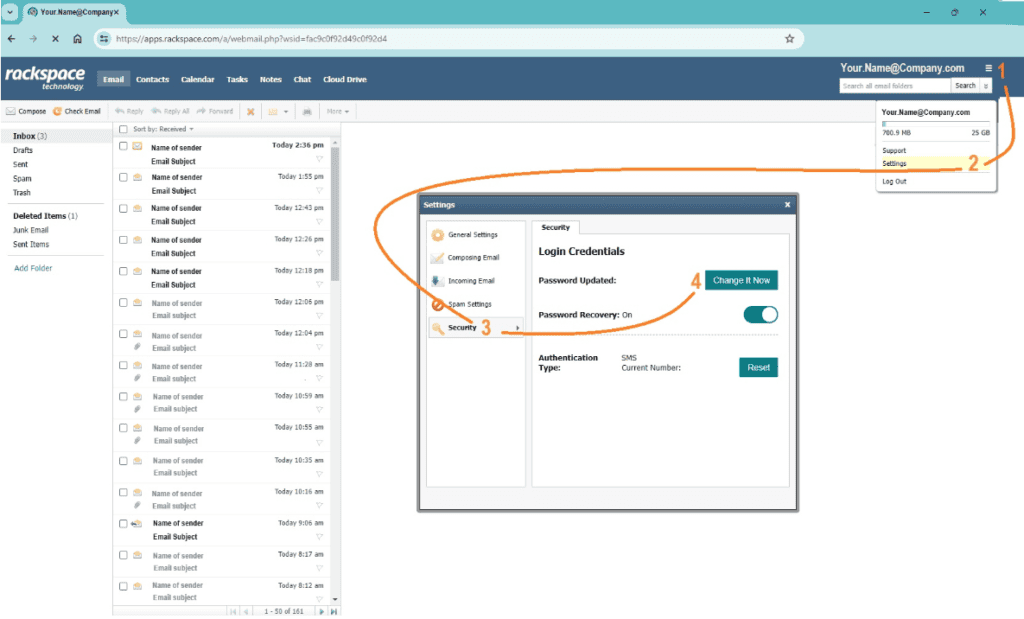
- Access your email via your web browser
- Click on the hamburger menu in the top right
- A dropdown appears. Click on ‘Settings’
- A pop-up box appears. Click on ‘Security’
- Click on ‘Change It Now’
Identifying suspicious email
We have heard that scammers send out fake RackSpace emails. Please check that any email you receive is genuine.
Page created 08.10.24