Google Analytics
The most frequently asked questions:
The previous iteration of Google Analytics (GA4) was called Universal Analytics (UA) or ‘Classic’. This page references both for context, but all current sites use GA4.
What is Google Analytics (GA4)?
Google Analytics (GA4) is a platform that collects data from your website to create reports that provide insights into your business.
To measure a website, you first have to create a GA4 account. Then you need to add a small piece of JavaScript measurement code to each page on your site. Every time a user visits a webpage, the tracking code will collect pseudonymous information about how that user interacted with the page.
The measurement code will also collect information from the browser like the language setting, the type of browser (such as Chrome or Safari), and the device and operating system on which the browser is running. It can even collect the “traffic source,” which is what brought users to the site in the first place. This might be a search engine, an advertisement they clicked on, or an email marketing campaign.
There is more information on Google’s source webpage
What does Creative Stream do?
Creative Stream will help create the GA4 account and property (if you don’t already have one) and add the code to a site. We’ll confirm it’s collecting data for you, and show you how to add additional staff members.
If any of our work causes a problem with the analytics code, we’d look to correct it, but GA4 is an external addition that comes to you directly so we can’t provide training and support as this is a specialist area. Think of it like this…
If you bought a car and it had a Garmin SatNav in it, you’d use the instruction manual from Garmin to educate yourself on how to get the most from it, and although the car dealership might be able to help a little, the SatNav is not their product so they aren’t best-placed to train you about it.
However, we understand that you may have questions or want more help, and we like to think we’ll nudge clients in the right direction, so we created this page of information to help you. Please note that this page is specific to Google Analytics, and doesn’t encompass Google Search Console, Google Tag Manager, Google Ads, etc.. These are more specialised, and we cannot advise. Work on these typically requires additional costs, and you must provide specific details.
What email address can I use for GA4?
Q: Does it have to be a Gmail account?
No. You can access GA4 with any email address, provided it is linked to a Google Account.
Note: a Google account is not the same as a Gmail account A Google Account is a username and password that can be used to log in to consumer Google applications like Docs, Sites, Maps, and Photos, but a Google account doesn’t necessarily end with @gmail.com.
All Gmail.com accounts are Google accounts, but not all Google accounts are Gmail.com accounts
Read this info from January 2024 “How to Access Google Analytics Without Gmail” and this (very similar) information from October 2023 “How to access Google Analytics without Gmail (2 options) ” and also How to Create a Google Account With a Company Email Address (publish date is unknown).
Q: Can you set up a Gmail email account for me?
During the Gmail email account creation, it will need to know a mobile number to link the email address and will send a code to it to verify it. This means that you’d need to be online/on call to us as it must be your mobile number (we cannot use Creative Stream mobile numbers for your account). We can assist you if you’re struggling, and there will be a fee.
How do I log in?
Google explains how to log in to your Google Analytics account
I’m locked out
Each situation is unique and will incur a small cost depending on the circumstances. Google has an advice page Tips to complete account recovery steps – Google Account Help and we have listed some possibilities below.
- Option 1: Trigger a code to us
Note: We are unable to do this with newer email accounts as Gmail changed the process.
Historically, we set up the Gmail email account for clients and gave them all the details and they changed the password and took over control. During that process, we made one of our email accounts the ‘backup’ for that email address in case you got locked out.
If you have an account with a backup, then over the course of a couple of (working) days, we can get you back into the account again.
Look for an option such as “Forgot password”, and if info@cs.isarriving.com is one of the backup accounts, then emails can be triggered to us with codes and password resets.
The first email is time-sensitive so we must be given advance notice as we have to be on stand-by to check that specific inbox to give you the code over the phone.
This triggers a second email while Google checks the authenticity, and that comes within 48 hours. We’ll need to be in contact with you during the whole process, so it’s best done early in the week rather so we don’t miss an incoming email over the weekend.
- Option 2: A phone number is associated with the account
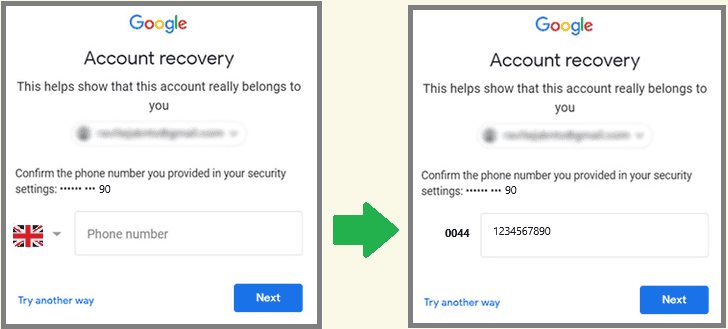
As above, there are times when we set the account up and during that process, we used one of our mobile numbers as a backup. The last two digits of the phone number are often seen (see below left). If you do not recognise them, contact us with a screenshot, as we might be able to help.
- Option 3: Add a new email address
If we have access, we can add a new Gmail email address (that you have created) to your analytics account and give you permissions equal to those we hold.
This is provisional on us having access with the appropriate permissions. If you didn’t give us access, removed us, or gave us a low level of access then we can’t help you.
Please note that you need to create a new Gmail email, this is not something that we can do for you as it requires linking to a mobile phone number, and we cannot use our phone numbers for your business.
- Option 4: Start Afresh with a new GA4 account and email
If the first two options above are not available to you, then you may need to accept that you’ve lost the historical data and need to start from scratch. We’ll help you review/discuss the options.
I don’t know how to use it
The transition from Universal Analytics (UA) to Google Analytics 4 (GA4) has been widely perceived as a significant jump in technical complexity, particularly for those accustomed to the more straightforward setup and reporting of UA. This is an area that requires specialist knowledge, and as such, we cannot train you. However, there are many tutorials online, and as long as you find information that’s not dated before 2025, you should be fine.
GOV.UK has some information that might help, even though it’s called Understand differences between UA and GA4

Try these links:
- If you want help understanding GA4, try here: Understanding Google Analytics Reports
- You could also learn about Common reporting solutions in Google Analytics 4
Why can’t I find my new website in a Google search?
If you have a brand-new URL that’s just gone live, Google won’t have had the chance to crawl it.
Generally, it takes Google anywhere from 4 days to 4 weeks to index a new website. However, this can vary depending on the size of the website, the quality of the content, and the number of external links pointing to the website. Source
We recommend:
- having a good network of links within your site (which helps your clients and SEO) by linking to/from pages on the site
- links to and from any related sites you have, and from other people’s sites (known as inbound/backlinks)
- promoting your site on your social media accounts, newsletters, in-house bulletins, adding the URL to your email signature etc.
We aren’t involved in SEO as this is a specialist, ever-changing area, however, we can suggest a trusted company if you want to hire someone for assistance with your site’s optimisation.
How can analytics help us?
It’s crucial to know which are your landing pages and how clients are driven to your site and where they exit.
You should measure interaction with your site, particularly after an event (when you’ll notice a spike in visits), and you might notice that you get more clients from Facebook than Twitter, or after a fund-raising event or a Christmas ‘do’ with Santa, or via a link from another website.
Investigating and understanding your data helps you build engaging content and create a better site.

Example 1:
~You know that the ‘footfall’ through your door is always people aged 50+
~Your analytics says that 40% of people who visit your website are aged 25-35.
~You know that people aged 25-35 were interested enough to visit your website but decided against visiting you physically.
~You can now dig deeper and work out if they went elsewhere, or, if they stayed on your site and spent a long time there and prefer to engage with the website rather than you and your premises.
Knowing this has a direct influence on the type of content you add to your site. If you only added content on your site that was directed at the age group you physically saw (those aged 50+) then you’d be ignoring the huge percentage of younger visitors.
Example 2:
We found out that one of our clients had an amazing recipe that was driving the majority of the visits to the site.
Users went directly to that recipe (that used the product being sold on the site), and the visitors stayed on that page (probably while they baked the cake) and then exited without going to other pages.
Knowing this, they realised they needed to improve links, content, CTAs (Calls to Action) and the awareness of their product to increase sales.
We also looked at spikes in their traffic and noted a marked increase at the time of a collaboration with a local celebrity on Instagram, so they could then review where their marketing budget was spent.
Google – site crawl
Google’s frequency of crawling a site varies widely, ranging from a few days to a few weeks.
Crawl budget: A crawl budget is the time and resources a search engine allocates for crawling a website, determining how many pages it will scan and consider for search results. Factors that impact crawl budget:
- Website performance: Slower websites may receive a lower crawl budget.
- Website size: Larger sites generally get a larger crawl budget.
- Content freshness: Google prioritizes crawling sites that publish or update content frequently.
- Internal linking: A well-structured internal linking strategy can help Google discover and crawl more pages.
- Redirects: Unnecessary redirects can waste crawl budget.
- Crawl errors: Errors can indicate problems with your site that need to be addressed.
Larger, more popular sites with regular updates are crawled more frequently, while smaller or newer sites may experience longer gaps between crawls.
Google keeps quiet about the exact reasons and schedules for crawling a site. The last information we could find is from January 2022, where a Google Community Manager said, ‘To have your contents/documents reindexed by Google, you can create a sitemap containing all the updated contents by adding date and submit the sitemap to Google Search Console for indexing. Please refer to the document: Build and submit a sitemap and Manage your sitemaps using the Sitemaps report
If this is critical to you, you will need to hire someone, as this is not our specialist field.
Google – indexing
Google indexing is the process where Google’s spiders analyse and store website content in its database, allowing pages to appear in search results.
- Crawling and Indexing: Google uses “crawlers” or “spiders” (like Googlebot) to explore the internet and discover new web pages. This process is called crawling.
- Analysing Content: Once a page is crawled, Google’s algorithms analyse the content, including text, images, and video, to understand its meaning and relevance.
- Storing in the Index: If a page meets Google’s quality and relevance criteria, it’s added to the Google index, which is a vast database of all the web pages Google knows about.
- Visibility in Search Results: Only pages that are indexed can appear in Google’s search results.
- Importance for SEO: Indexing is a crucial step in Search Engine Optimization (SEO) as it determines whether your website pages are visible to potential users searching on Google.
Does cookie consent affect analytics?
The ICO requests that no tracking take place without user consent, and this affects how much data is collected for analysis. New rules for Google Consent Mode V2 took place in March 2024, and as website owners, you must decide if you need to take action. The governing body is the ICO, so consider reading the six ICO pages on cookies to make a more informed decision.
“Where you operate an online service and any use of cookies will be for your own purposes, it is clear that you will be responsible.”
ICO
Depending on your type of site and content, you could have a rating system where a user freely chooses to click a button and give a rating (for a page, a course, a resource, an event, etc) thus providing you with some data to analyse. Have a chat with us.
Levels of permission in GA4
Admin, Editor, Marketer, Analyst, Viewer, None… there are numerous options, and you’ll need to see if you want them applied to the property, the account, or both.
Advice about Access and Data Restriction Management
SEO
If you have a WordPress site, you typically have ‘Yoast‘ installed. Yoast is an external product (like GA4), and as such, we’ll refer you to them so that you have current information and help from the supplier on how best to maximise your site’s presence on the web. For instance, a question we’ve been asked a couple of times is about Google’s meta tag showing an incorrect description. You’ll find helpful YouTube videos from content creators about Yoast so that you can increase your knowledge in this field.
We aren’t involved in SEO as this is a specialist, ever-changing area. However, we can suggest a trusted company if you want to hire someone to assist with your site’s optimisation.
New Information added 03.03.25
Full Information review 01.02.24
Information created 13.02.23


Other pages you might find useful: